MEXC Futures Calculator: How to Use It to Set Take-Profit and Stop-Loss PricesMEXC Futures Calculator: How to Use It to Set Take-Profit and Stop-Loss Prices
Category List
Cancel

MEXC Futures Calculator: How to Use It to Set Take-Profit and Stop-Loss Prices

Key Takeaways:

  • The MEXC Futures calculator is a free built-in tool that can be used to estimate key trading metrics without opening a position. It provides six core functions: PNL, target price, liquidation price, max open, entry price, and funding fee.
  • The liquidation price function helps users estimate liquidation risk in advance, while the target price function can be used as a reference when setting take-profit levels.
  • The Futures calculator is available on both web and app, with a simple process for entering the required parameters and obtaining calculation results.
  • The calculation results are for reference only. Actual trading outcomes may be affected by trading fees, funding fees, slippage, and other factors.

1. What Is the MEXC Futures Calculator?


The MEXC Futures calculator is a built-in tool designed to help users estimate key metrics for Futures trading. Before opening a position or while holding one, users can calculate estimated PNL, target prices, liquidation prices, funding fees, and other key figures without placing an order.

This can help users manage their positions, assess potential risks, and make more informed trading decisions.

2. Why Use the Futures Calculator?


Futures trading involves leverage, which can amplify both potential gains and losses. Using the MEXC Futures calculator allows users to assess key price levels before entering a trade and incorporate these estimates into their risk management strategy.

For example, before opening a position, users can enter their available margin and intended position size to estimate the liquidation price. They can then use this information to determine appropriate take-profit and stop-loss levels and manage liquidation risk more effectively.

3. Six Core Functions of the MEXC Futures Calculator


PNL: Calculate potential profit or loss


The PNL function helps users estimate how much they may earn or lose when the fair price reaches their target level.

Select long or short, then enter the leverage, entry price, close price, and Futures quantity to calculate the estimated PNL.

Target Price: Determine a take-profit target


The target price function helps users determine the target price required to achieve a desired PNL rate.

Select long or short, then enter the leverage, entry price, target PNL rate, and Futures quantity. The calculated target price can be used as a reference when setting a take-profit level.

Liquidation Price: Estimate the liquidation price in advance


The liquidation price function estimates the fair price at which a position may be forcibly closed.

Select Cross Margin or Isolated Margin, then enter the position direction, leverage, entry price, and Futures quantity.

The calculation method differs between Cross Margin and Isolated Margin.

  • Under Isolated Margin, enter the average entry price and position size. The calculator will automatically estimate the minimum margin required for the position and the corresponding liquidation price.
  • Under Cross Margin, you also need to enter the total available margin in your Futures account. If you hold multiple positions under Cross Margin, the calculated result may differ from the actual liquidation price. Refer to the position page for the applicable result.

Max Open: Calculate the contract value you can open


The max open function helps users determine the contract value they can open based on their available margin.

Select long or short, then enter the leverage, entry price, and available margin to calculate the maximum position size.

Entry Price: Calculate the average entry price


A Futures position may be built through multiple trades, with each trade having a different price and quantity. The entry price function calculates the average entry price across multiple trades.

Enter the entry price and corresponding Futures quantity for each trade to calculate the average entry price.

Funding Fee: Check the funding rate and payment direction


The funding fee function helps users check the funding rate for the contract under current market conditions and determine whether the funding fee is paid by long or short position holders.

Select long or short, then enter the fair price, Futures quantity, and funding rate to calculate the funding fee.

4. How to Use the MEXC Futures Calculator


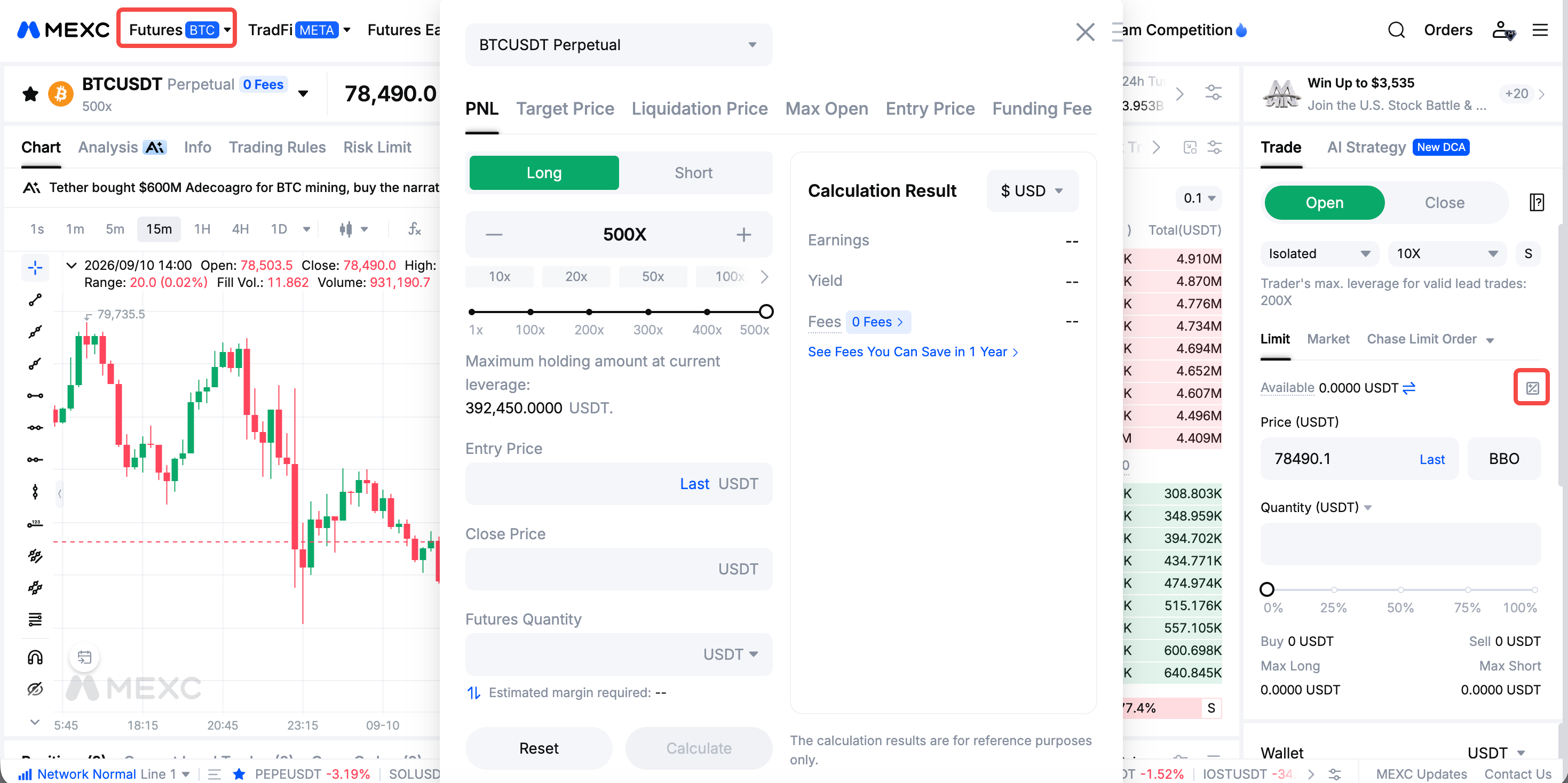
4.1 Web


1)Go to the MEXC website and open the Futures trading page.
2)Click the Futures calculator icon on the Futures trading page.
3)Select the required calculator function and enter the relevant parameters to generate the calculation result.


4.2 App


1)Open the MEXC app and tap Futures on the home page.
2)Tap … on the Futures trading page.
3)Tap Calculator to open the calculator.
4)Select the required function and enter the relevant parameters to complete the calculation.


5. Important Notes When Using the Futures Calculator


1)Make sure you understand each parameter and enter the correct values. When calculating the estimated liquidation price, pay particular attention to the difference between Cross Margin and Isolated Margin.

2)The calculation results provided by the MEXC Futures calculator are for reference only. Actual trading results may be affected by trading fees, funding fees, slippage, and other factors. Refer to the actual fees charged and execution results.

3)Futures trading involves significant risk. Use appropriate risk management measures and set reasonable take-profit and stop-loss levels.

6. Futures Calculator FAQ


6.1 How do I use the Futures calculator?


Open the Futures trading page on MEXC and click Futures calculator. Select the required function and enter parameters such as position direction, leverage, and entry price. The calculator will automatically generate the result without requiring an open position.

6.2 How is Futures PNL calculated?


Use the PNL function and enter the position direction, leverage, entry price, close price, and contract quantity. The calculator will estimate the potential profit or loss of the position.

6.3 How is the liquidation price calculated?


Under the Liquidation Price tab, select the margin mode and position direction, then enter the leverage, entry price, and Futures quantity. The calculator will estimate the liquidation price.

The calculation may differ between Cross Margin and Isolated Margin. Under Cross Margin, the available margin in your Futures account may also affect the result.

6.4 How does leverage affect the liquidation price?


Higher leverage means a lower margin requirement and generally places the liquidation price closer to the entry price. This increases the risk of liquidation. You can use the Futures calculator to compare liquidation prices at different leverage levels before opening a position.

6.5 What is the funding rate? How is the funding fee calculated?


The funding rate is the rate used to calculate periodic payments between long and short positions in Futures. Under the Funding Fee tab, enter the position direction, Fair Price, Futures Quantity, and funding rate to estimate the funding fee.

6.6 How do I determine take-profit and stop-loss prices?


You can use the liquidation price function to estimate the liquidation price and the target price function to calculate a target price based on your desired PNL rate. These results can be used as references when setting take-profit and stop-loss levels.

6.7 Are the results from the Futures calculator accurate?


The calculation results are for reference only. Actual trading results may be affected by trading fees, funding fees, slippage, and other factors. Refer to the actual execution results and fees charged.

6.8 Can I use the Futures calculator on the MEXC App?


Yes. The Futures calculator is available on both the MEXC app and web. The core calculation functions are available on both platforms.


MEXC Futures Calculator: How to Use It to Set Take-Profit and Stop-Loss Prices

Key Takeaways:

  • The MEXC Futures calculator is a free built-in tool that can be used to estimate key trading metrics without opening a position. It provides six core functions: PNL, target price, liquidation price, max open, entry price, and funding fee.
  • The liquidation price function helps users estimate liquidation risk in advance, while the target price function can be used as a reference when setting take-profit levels.
  • The Futures calculator is available on both web and app, with a simple process for entering the required parameters and obtaining calculation results.
  • The calculation results are for reference only. Actual trading outcomes may be affected by trading fees, funding fees, slippage, and other factors.

1. What Is the MEXC Futures Calculator?


The MEXC Futures calculator is a built-in tool designed to help users estimate key metrics for Futures trading. Before opening a position or while holding one, users can calculate estimated PNL, target prices, liquidation prices, funding fees, and other key figures without placing an order.

This can help users manage their positions, assess potential risks, and make more informed trading decisions.

2. Why Use the Futures Calculator?


Futures trading involves leverage, which can amplify both potential gains and losses. Using the MEXC Futures calculator allows users to assess key price levels before entering a trade and incorporate these estimates into their risk management strategy.

For example, before opening a position, users can enter their available margin and intended position size to estimate the liquidation price. They can then use this information to determine appropriate take-profit and stop-loss levels and manage liquidation risk more effectively.

3. Six Core Functions of the MEXC Futures Calculator


PNL: Calculate potential profit or loss


The PNL function helps users estimate how much they may earn or lose when the fair price reaches their target level.

Select long or short, then enter the leverage, entry price, close price, and Futures quantity to calculate the estimated PNL.

Target Price: Determine a take-profit target


The target price function helps users determine the target price required to achieve a desired PNL rate.

Select long or short, then enter the leverage, entry price, target PNL rate, and Futures quantity. The calculated target price can be used as a reference when setting a take-profit level.

Liquidation Price: Estimate the liquidation price in advance


The liquidation price function estimates the fair price at which a position may be forcibly closed.

Select Cross Margin or Isolated Margin, then enter the position direction, leverage, entry price, and Futures quantity.

The calculation method differs between Cross Margin and Isolated Margin.

  • Under Isolated Margin, enter the average entry price and position size. The calculator will automatically estimate the minimum margin required for the position and the corresponding liquidation price.
  • Under Cross Margin, you also need to enter the total available margin in your Futures account. If you hold multiple positions under Cross Margin, the calculated result may differ from the actual liquidation price. Refer to the position page for the applicable result.

Max Open: Calculate the contract value you can open


The max open function helps users determine the contract value they can open based on their available margin.

Select long or short, then enter the leverage, entry price, and available margin to calculate the maximum position size.

Entry Price: Calculate the average entry price


A Futures position may be built through multiple trades, with each trade having a different price and quantity. The entry price function calculates the average entry price across multiple trades.

Enter the entry price and corresponding Futures quantity for each trade to calculate the average entry price.

Funding Fee: Check the funding rate and payment direction


The funding fee function helps users check the funding rate for the contract under current market conditions and determine whether the funding fee is paid by long or short position holders.

Select long or short, then enter the fair price, Futures quantity, and funding rate to calculate the funding fee.

4. How to Use the MEXC Futures Calculator


4.1 Web


1)Go to the MEXC website and open the Futures trading page.
2)Click the Futures calculator icon on the Futures trading page.
3)Select the required calculator function and enter the relevant parameters to generate the calculation result.


4.2 App


1)Open the MEXC app and tap Futures on the home page.
2)Tap … on the Futures trading page.
3)Tap Calculator to open the calculator.
4)Select the required function and enter the relevant parameters to complete the calculation.


5. Important Notes When Using the Futures Calculator


1)Make sure you understand each parameter and enter the correct values. When calculating the estimated liquidation price, pay particular attention to the difference between Cross Margin and Isolated Margin.

2)The calculation results provided by the MEXC Futures calculator are for reference only. Actual trading results may be affected by trading fees, funding fees, slippage, and other factors. Refer to the actual fees charged and execution results.

3)Futures trading involves significant risk. Use appropriate risk management measures and set reasonable take-profit and stop-loss levels.

6. Futures Calculator FAQ


6.1 How do I use the Futures calculator?


Open the Futures trading page on MEXC and click Futures calculator. Select the required function and enter parameters such as position direction, leverage, and entry price. The calculator will automatically generate the result without requiring an open position.

6.2 How is Futures PNL calculated?


Use the PNL function and enter the position direction, leverage, entry price, close price, and contract quantity. The calculator will estimate the potential profit or loss of the position.

6.3 How is the liquidation price calculated?


Under the Liquidation Price tab, select the margin mode and position direction, then enter the leverage, entry price, and Futures quantity. The calculator will estimate the liquidation price.

The calculation may differ between Cross Margin and Isolated Margin. Under Cross Margin, the available margin in your Futures account may also affect the result.

6.4 How does leverage affect the liquidation price?


Higher leverage means a lower margin requirement and generally places the liquidation price closer to the entry price. This increases the risk of liquidation. You can use the Futures calculator to compare liquidation prices at different leverage levels before opening a position.

6.5 What is the funding rate? How is the funding fee calculated?


The funding rate is the rate used to calculate periodic payments between long and short positions in Futures. Under the Funding Fee tab, enter the position direction, Fair Price, Futures Quantity, and funding rate to estimate the funding fee.

6.6 How do I determine take-profit and stop-loss prices?


You can use the liquidation price function to estimate the liquidation price and the target price function to calculate a target price based on your desired PNL rate. These results can be used as references when setting take-profit and stop-loss levels.

6.7 Are the results from the Futures calculator accurate?


The calculation results are for reference only. Actual trading results may be affected by trading fees, funding fees, slippage, and other factors. Refer to the actual execution results and fees charged.

6.8 Can I use the Futures calculator on the MEXC App?


Yes. The Futures calculator is available on both the MEXC app and web. The core calculation functions are available on both platforms.